Last updated: Sep 28, 2026 at 12:33PM
A brand new listing is never blank. The moment it's created, Osello fills in every field it can answer with certainty from data you already have — your product details, your marketplace settings, and the values its sibling variants already use. Only what's left over goes to the AI.
Why this matters
The fields filled this way aren't guesses. Osello only fills a field automatically when there is exactly one correct answer in your data, so these values need no review and carry no confidence score. That means less for the AI to do, lower cost, and fewer values for you to check.
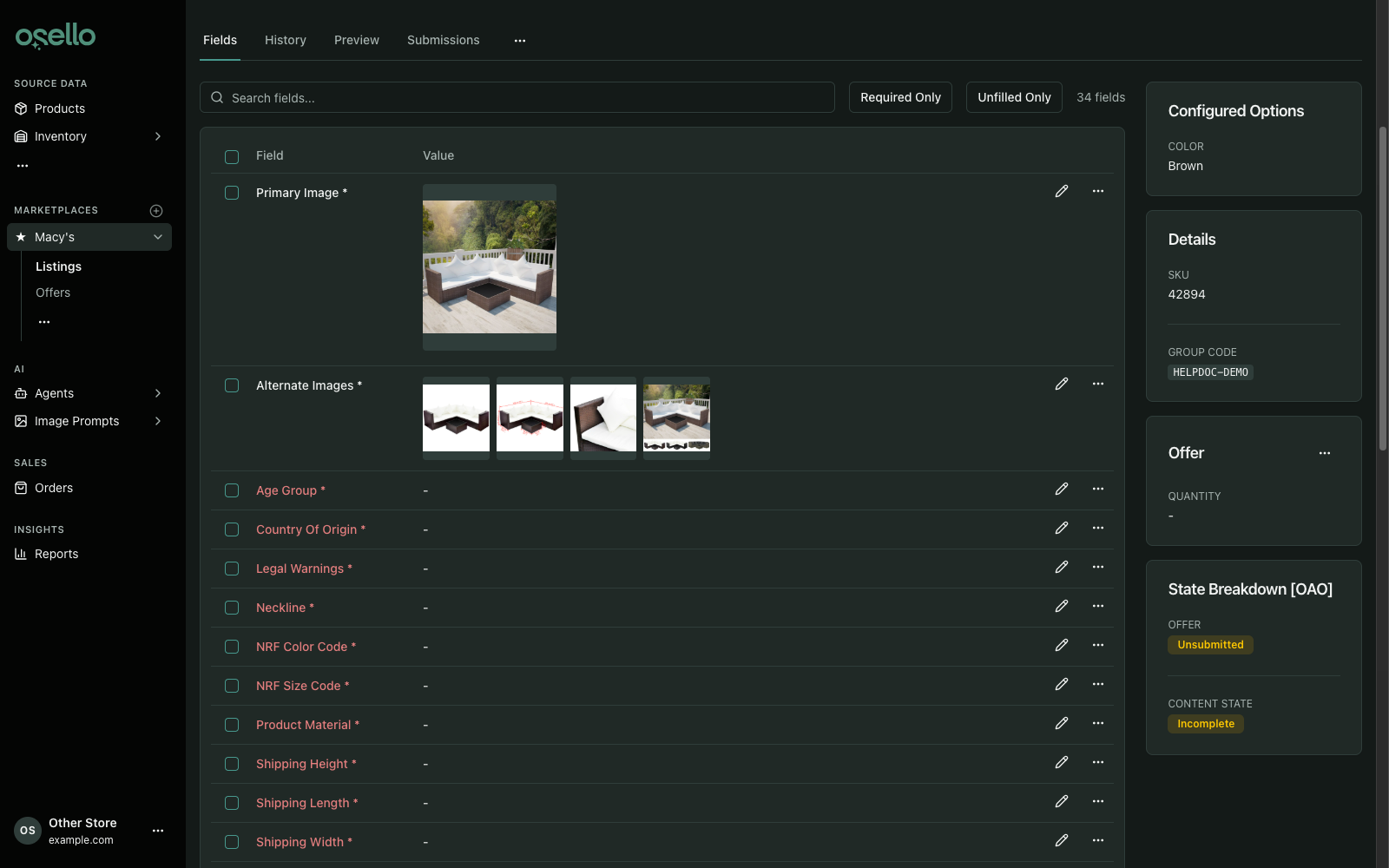
What Osello fills in
Values you've fixed for the marketplace. If you've set a field to Fixed Value on the marketplace's field settings, every new listing gets that value immediately. This is the fastest way to stop answering the same question for every product — a country of origin that never changes, a warranty statement, a care instruction.
Details that come straight from your products. When your product data already holds the answer, Osello copies it across: brand, country of origin, MPN, and the barcode into UPC and ISBN fields (an ISBN field only takes a barcode starting with 978 or 979). If your store is set to use one brand for all products, that brand is used. Where a variant has no value of its own, Osello falls back to the product's shared details.
Product images. The primary image and the alternate images are chosen from the images on your product. Osello prefers an image that already meets the marketplace's rules for that field — the right shape, a white background, the product facing the camera — and it won't pick the same photo for both the primary image and the alternates. When the product is already listed on another marketplace, the images from that listing are reused, and an image of the wrong shape is cropped (background only) into a version that waits for your approval. See how Osello chooses your listing images.
Sizes and colors the marketplace already knows. When a marketplace offers a list of choices and one of them clearly matches your variant, Osello selects it — an "XS" option for an "XS" size, or "X-Small" for "XS". Size and color codes are matched the same way.
Size type. Marketplaces such as Nordstrom ask for a size type (Regular, Petite, Plus, Toddler and so on) next to each size. Osello fills it when your variant says so for certain:
- A Size Type option on the variant, such as "Petite" or "Women's Plus".
- A size type written into the size, such as "32 Regular" or "11 Little Kid".
- A size only one size type uses: month sizes like "6-12M" and "24 Months" are Baby, "2T" to "4T" are Toddler, "4P" or "SP" are Petite, "LT" or "XLT" are Tall, and "0X" or "1X" are Plus.
- On kids products, kids sizes: 4 to 7 (and 6X) are Little Kid, and "S (7/8)", "M (10/12)", "L (14/16)" and "XL (18/20)" are Big Kid. Osello recognizes a kids product from its category or product type.
- A product in a maternity category is Maternity.
When your listing variant's size has lost the marker (you listed "4P" as "4"), Osello reads the size on your product instead. A plain size such as "M" or "8" is left for the AI, because Regular, Petite and Tall sizes use the same size values.
Swatch and size chart images, when your product carries them.
A value its sibling variants already share. Some fields hold one value for a whole group of variants. A new variant joining an existing listing picks up the value its group already has instead of needing its own. See required fields and listing readiness.
What Osello leaves alone
- Fields you've already filled. Automatic filling only ever touches empty fields. It never overwrites a value you set by hand, a value the AI produced, or a value that came back from the marketplace.
- Disabled fields. Disabling a field on its Settings tab, for all categories or one category, hides it from those listings and stops Osello filling or updating it.
- Imported listings. A listing import brings in each value exactly as it is in the file or on the marketplace. Nothing is filled in or cropped on top of it, even where the import left a field empty.
- Anything that needs judgment. Titles, descriptions, materials, and other fields with no single correct answer are left for the AI or for you.
When it runs
Automatic filling happens whenever field values are created or change — creating a listing, adding variants to one, changing a listing's category, or a change to the marketplace's own field requirements. You don't need to trigger it, and there's nothing to schedule.
After it runs, the listing's status badge shows how much is still missing. From there you can fill the rest with AI or type it in yourself.