
Last Week: Target+ Unlisting, Out-of-Sync Orders, and Style Integrity (October 21, 2026)
Disabled listings now come down on Target+, Osello flags orders Shopify canceled after they shipped, Style Integrity filters find broken size runs, and plan prices change.
Last updated: Oct 21, 2026 at 2:33AM
New Features
-
Disabled listings come down on Target+ — disabling a listing or variant now unlists it on Target+ and sends its stock as 0 to every distribution center. Enabling it again does not relist it: Target+ only puts an item back on sale once a new version is submitted and approved, and Osello reminds you to submit. You can also skip the enable step, since submitting a disabled listing or variant re-enables it, and the submit dialog warns you first. If Target+ refuses an unlist, the listing gets a sync issue naming each variant still up. Learn more
-
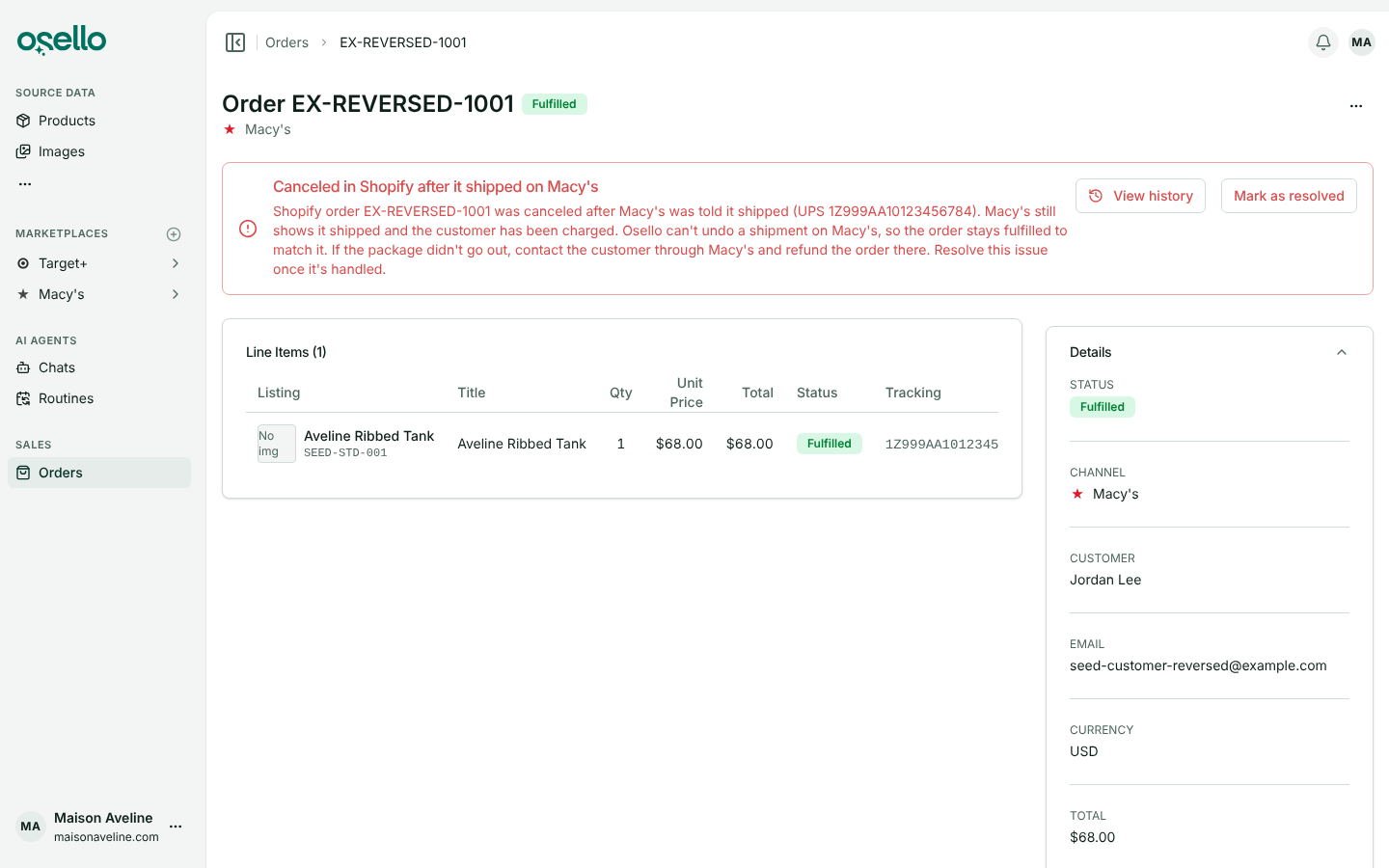
Orders canceled in Shopify after they shipped — when Shopify cancels an order, or its fulfillment, after Osello told the marketplace it shipped, the marketplace keeps the order as shipped and so does Osello. The order page shows a red alert saying what happened and what to do, your dashboard and the Orders list count the orders out of sync, and the Orders filters gain "Only orders out of sync with the marketplace". Order History now records every status change Shopify made, with who did it and when. Choose Mark as resolved on the alert once you have handled it. Learn more
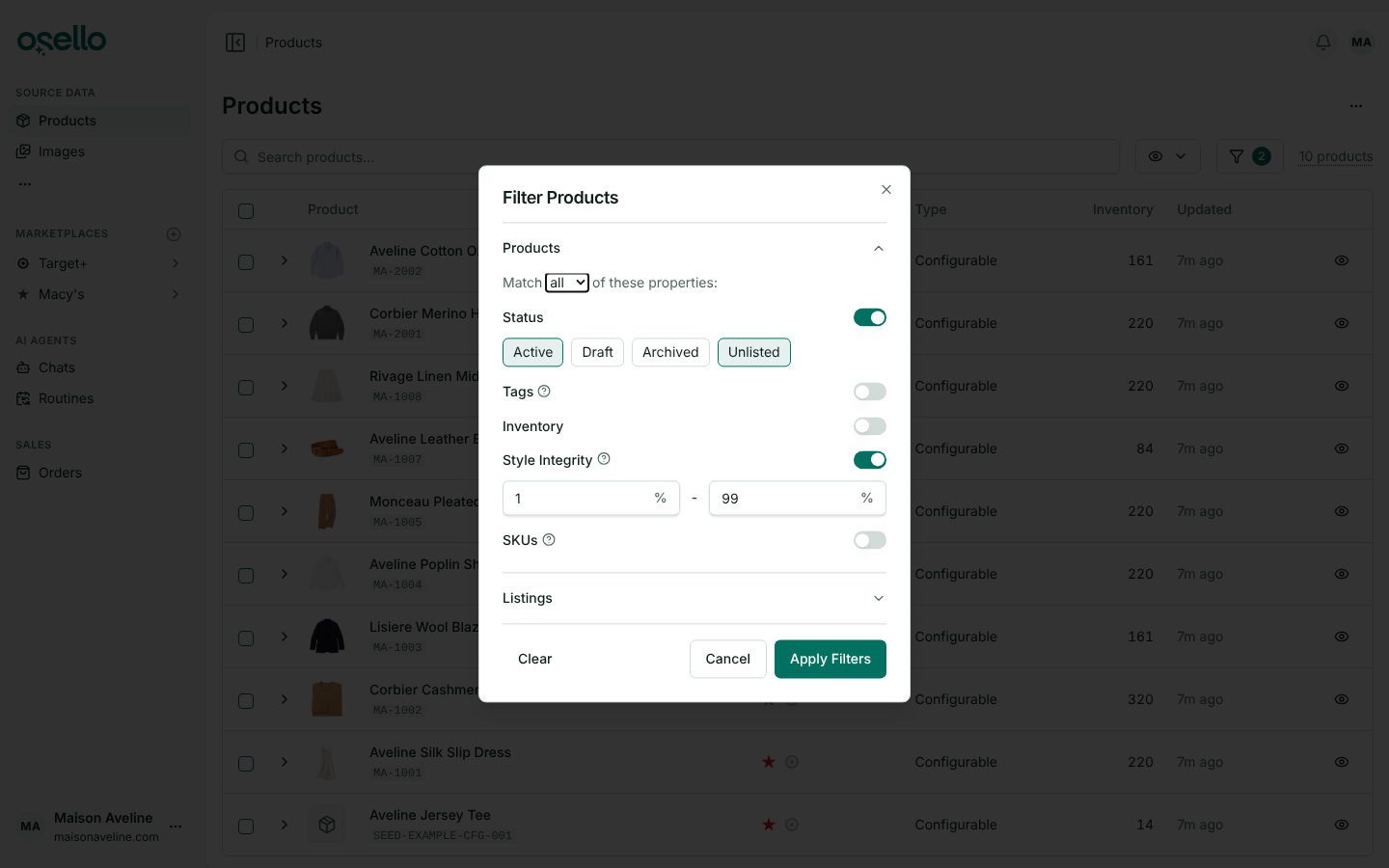
- Find broken size runs with Style Integrity — Style Integrity is the percentage of a style's variants with at least one unit in stock. Filter the Products page and a marketplace's Listings page by a minimum, a maximum or both, and add it to a marketplace's Products to List and Products to Unlist criteria. The Products to Unlist report now measures Total Inventory and Style Integrity on the stock that marketplace's offers carry rather than your source inventory, since those products are already listed there. Learn more
- Your AI assistant gets Osello's skills — a Claude, ChatGPT or other assistant connected to your account now follows the same step-by-step skills Osello's own agents use for creating listings from products, categorizing a listing, filling in its fields, merging listings and fixing images. Ask for the job and it finds the skill. Skills that edit images need an assistant that can edit images; one that can't says so, and you can run the skill from the image in Osello instead. Learn more
Improvements
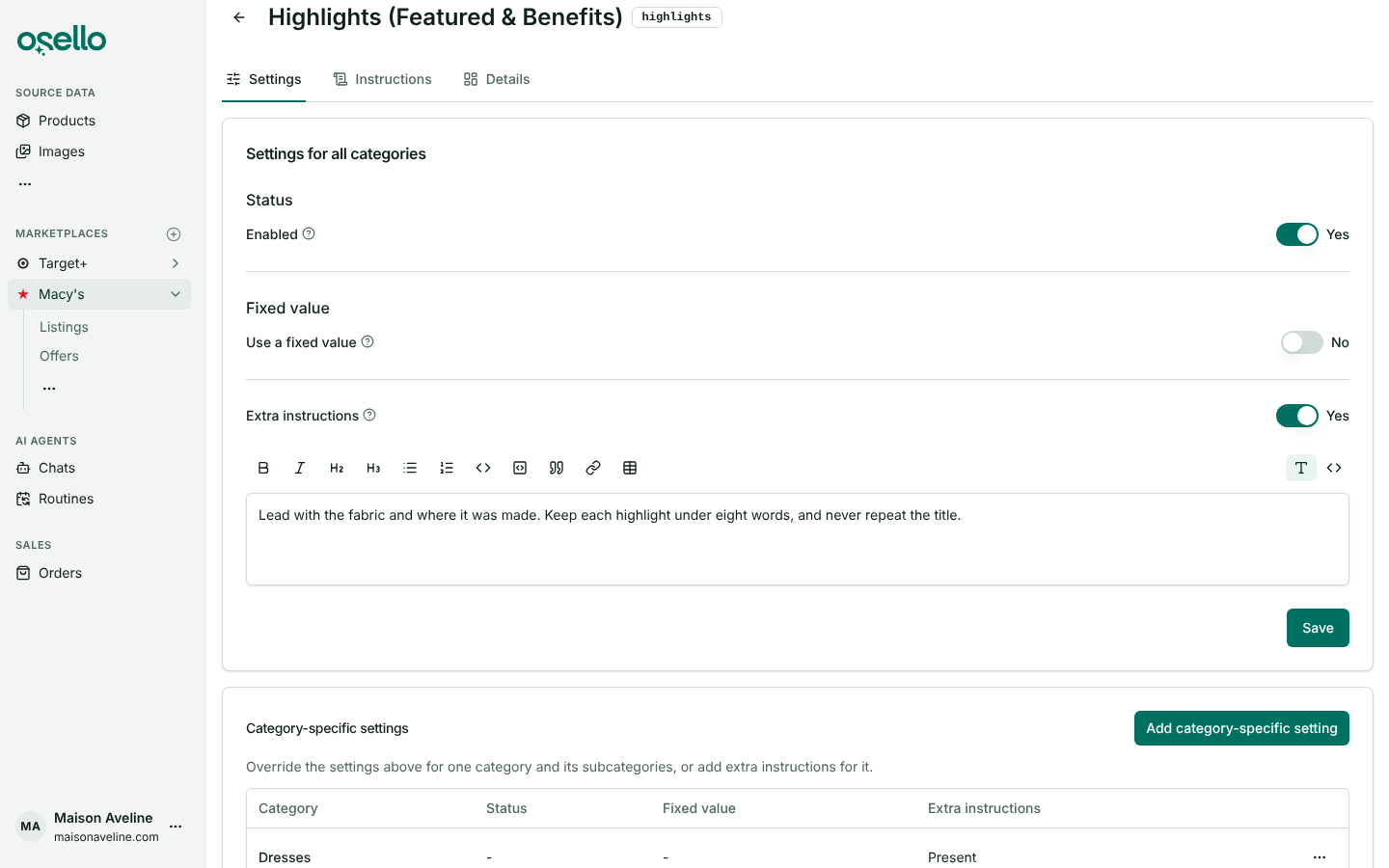
- A marketplace field's settings on one tab — a field's page now opens on Settings. One card holds its status, fixed value and extra instructions for all categories, with its own Save, and a table below lists the categories with settings of their own, each with Edit, Preview instructions and Delete. The Instructions tab shows what the AI ends up with for any category, with a link to wherever each part is set, and Applicable Categories moves to the last tab. The separate Edit page and the settings dialogs are gone. Learn more
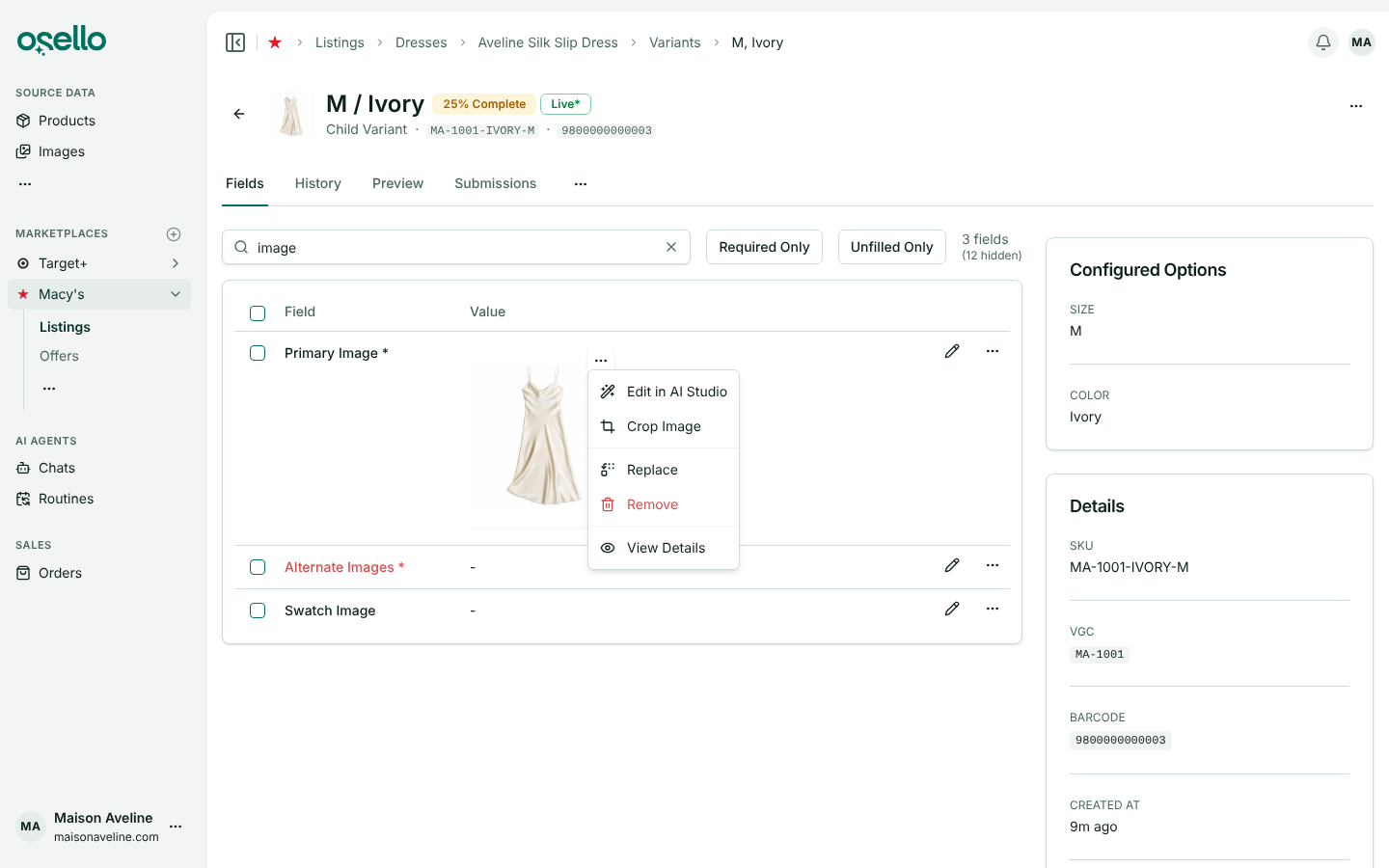
- Change a listing photo from the photo itself — on a listing's or variant's Fields tab, hover over any image and click the "..." button in its top-right corner to Edit in AI Studio, Crop Image, Replace, Remove or View Details. On a touch screen, tap the photo to show the button. The new photo takes the place of the one you opened the menu on, and the other alternate images stay where they are. The Image submenu on the field row's menu is gone, and approval badges now sit in every image's bottom-right corner. Learn more
-
Target+ listing status includes the parent product — Target+ reviews a listing's parent separately from its variants, so it can approve every variant while the parent is still pending. Until the parent is approved too, the listing reads Partially Pending Approval and Partially Live, and the badge tooltip lists the parent's state beside the variants. The "A previous version of this listing is currently live" banner now shows only when an older version really is live. Learn more
-
Unlisted items count as not listed — a product counts as listed on a marketplace only when at least one of its listing variants there is enabled and has not been unlisted by the marketplace. The Products to List and Products to Unlist reports, the Listings filters on the Products page and the marketplace icons in its Channels column all follow that rule. Learn more
-
Clearer rejections from Mirakl marketplaces — when a marketplace such as Nordstrom rejects with a note that only points elsewhere ("Look at the integration errors below"), Osello now reads those errors and shows each one as its own issue on the field it names, and the submission's Rejection Reason lists them. SKUs the marketplace accepted are no longer marked rejected because other SKUs in the same batch failed. Learn more
-
Target+ lining materials — listings in categories where Target+ asks about the lining have an Apparel lining materials field, and Apparel secondary lining materials for a second, smaller lining. Fill them in the same way as Apparel materials, with up to three materials each. Learn more
Other Notable Changes
-
Choosing an image no longer approves it — picking an image that is waiting for approval for a listing field, or attaching it to a product, leaves it in the approvals queue, and so does an AI assistant connected to your account attaching one for you. Approve it on the review page or with Approve on the image's own page, and every listing using it can be submitted again. Learn more
-
New plan prices — Small is $799 a month, or $499 a month billed yearly. Medium is $1,599 a month, or $999 a month billed yearly. Large is $3,299 a month, or $1,999 a month billed yearly, and its Active SKU limit rises to 100,000. Existing subscriptions keep their current price. See plans
API and MCP Updates
Version: 27.7.0
New endpoints
- MCP skills — the MCP server now offers Osello's AI skills to connected assistants:
list_skillsandget_skilltools, oneosello://skills/<name>resource per skill, and one prompt per skill. Each skill names the MCP tools it uses and the inputs it needs.
Updated/removed endpoints
GET /api/stores/{store_id}/productsand.../products/variants— takemin_style_integrityandmax_style_integrity(0-100, both ends included), the percentage of a product's variants with at least one unit in stock.listed_onandnot_listed_onnow count a product as listed only through an enabled listing variant the channel has not unlisted. On aproducts_to_unlistchannel report,min_total_inventory,max_total_inventoryand the style integrity filters measure the channel's offer stock instead of the source inventory.GET /api/stores/{store_id}/channels/{channel_id}/listings— takesmin_style_integrityandmax_style_integrity, measured on the listing's enabled variants' offers.GET /api/stores/{store_id}/orders— takesout_of_sync=trueto return only orders out of sync with their marketplace in a way the store has to resolve, such as an order canceled in Shopify after the marketplace shipped it.GET /api/stores/{store_id}/channels/{channel_id}/categories— takesapplicable_to_field(a field's handle or ID) to return only the categories the field applies to and the categories above them.POST /api/stores/{store_id}/channels/{channel_id}/listings/{id}/submitand.../listings/variants/mass_submit— on a channel whosereenables_disabled_on_submissionis true (Target+),include_disabled_variantsre-enables the variants it sends, and a disabled listing is always submitted whole with every variant re-enabled, whateveronly_changed_variantssays.- Channel — gains
reenables_disabled_on_submission(boolean or null). - Order —
external_integration_statuscan now end in/FULFILLMENT_NOT_REQUIREDor/REQUEST_DECLINED, Shopify's two newest fulfillment statuses, after any of its financial statuses.