
Last Week: Target+ Returns and Dashboard Sync Alerts (November 25, 2026)
Target+ returns now reach Osello and Shopify with their tracking, the dashboard flags open sync issues, and bulk listing actions report what happened to every listing.
Last updated: Nov 25, 2026 at 2:22AM
New Features
-
Target+ returns — Target+ runs returns itself and keeps showing a returned order as shipped, so until now a Target+ return never reached Osello. Osello now reads each returned item from Target+ as its own return on the order. It shows as Accepted as soon as Target+ lists it and as Refunded once Target+ has processed it, and the refund is recorded on the Shopify order. When nothing is coming back to you, the return is closed in Shopify with no restock. When the item is on its way back, the return stays open until you mark it received. A return Target+ closes without ever processing is marked Canceled. Osello brings in returns made from the day it first checked your Target+ channel for them. Learn more
-
Return tracking on your Shopify returns — when a marketplace reports the tracking for a return shipment, Osello adds the tracking number, and the link where the marketplace gives one, to the matching return in Shopify, where it shows as the return's shipment. If the tracking changes while the return is open, the Shopify return is updated. This works for Target+ and for Macy's, Nordstrom, Bloomingdale's and other Mirakl-based marketplaces. A return shipment you added in Shopify yourself is left as it is. Learn more
-
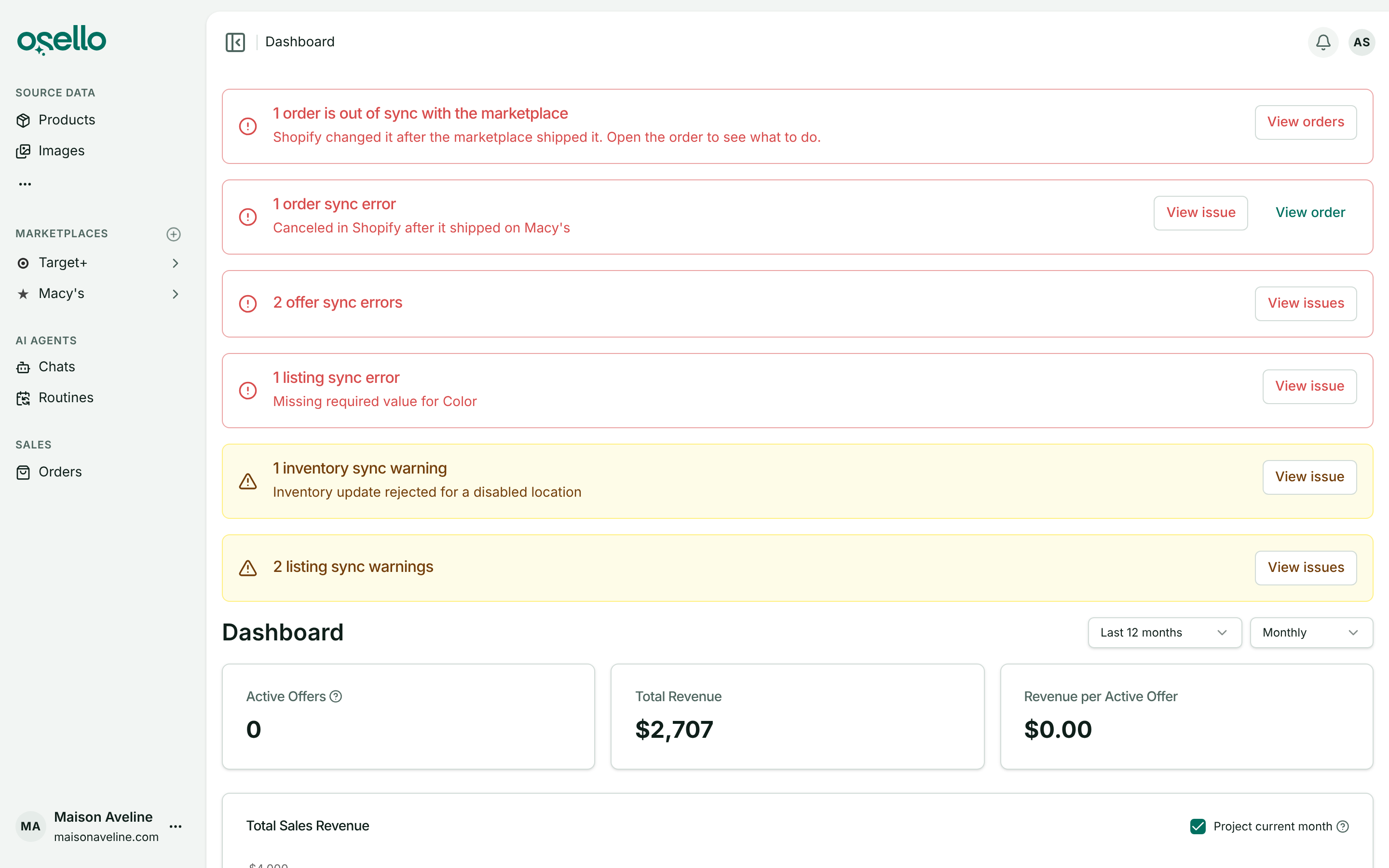
Open sync issues on your dashboard — the top of the dashboard now shows an alert for each kind of sync with an open issue (orders, returns, offers, inventory, products, listings), errors before warnings, with how many issues each holds. View issues opens the Sync Issues page filtered to that group. When a group holds a single issue, the alert shows its summary with View issue and a link to the order, product or other record it is about. The Sync Issues page has a matching Sync types filter. Learn more
Improvements
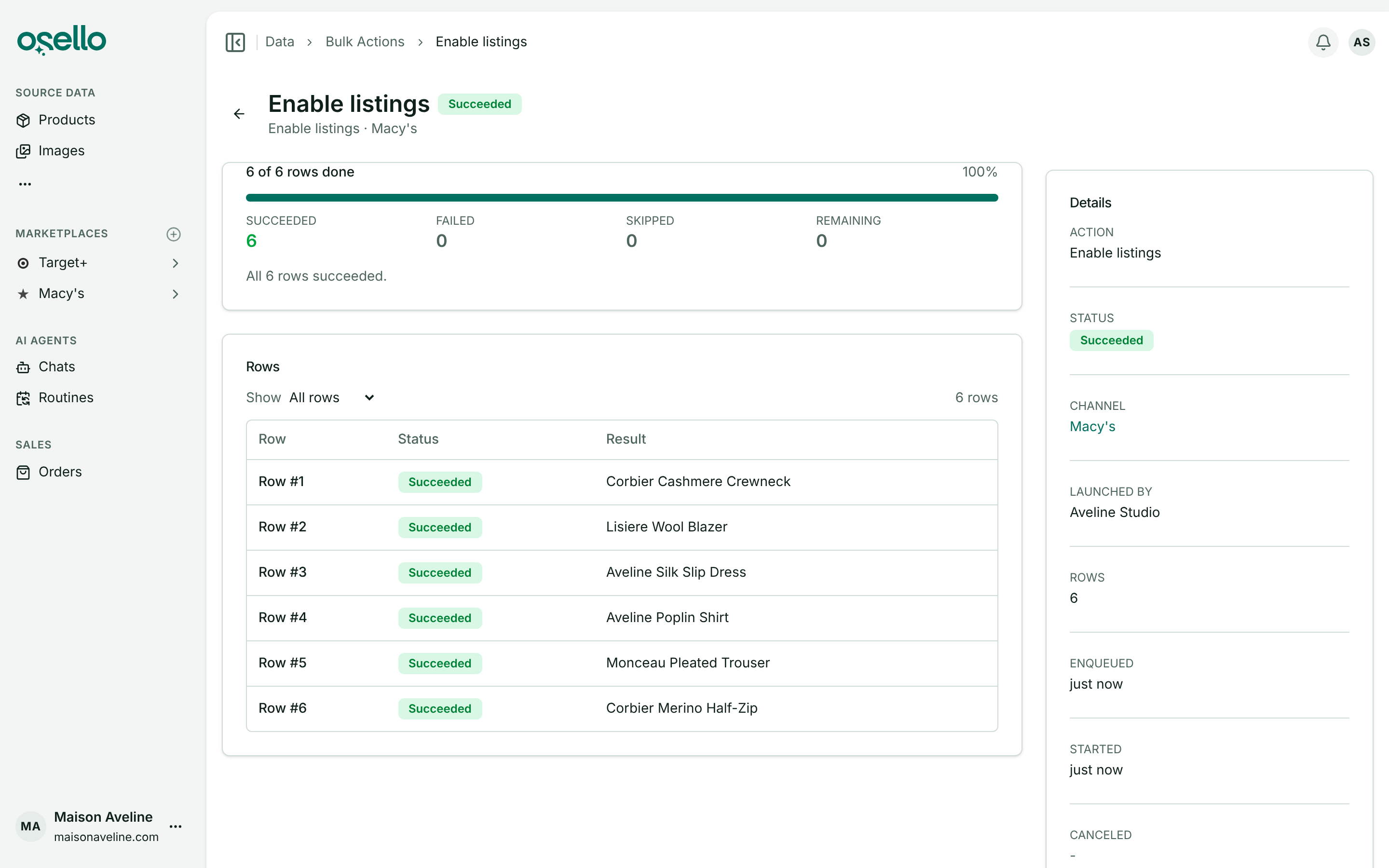
- Bulk listing actions report on every listing — enabling, disabling and deleting listings, setting a field to a fixed value, resetting field values, copying listings to another marketplace, auto-cropping images, and disabling listing variants from the SKU Status report or a product page now all run as bulk actions. Each gets its own page under Data -> Bulk Actions with a progress bar, succeeded, failed and skipped counts, and one row per listing that says what happened to it, such as variants left disabled because an active variant already uses their SKU, or a listing that still has to be submitted again. Until now these ran in the background with nothing to follow. Learn more
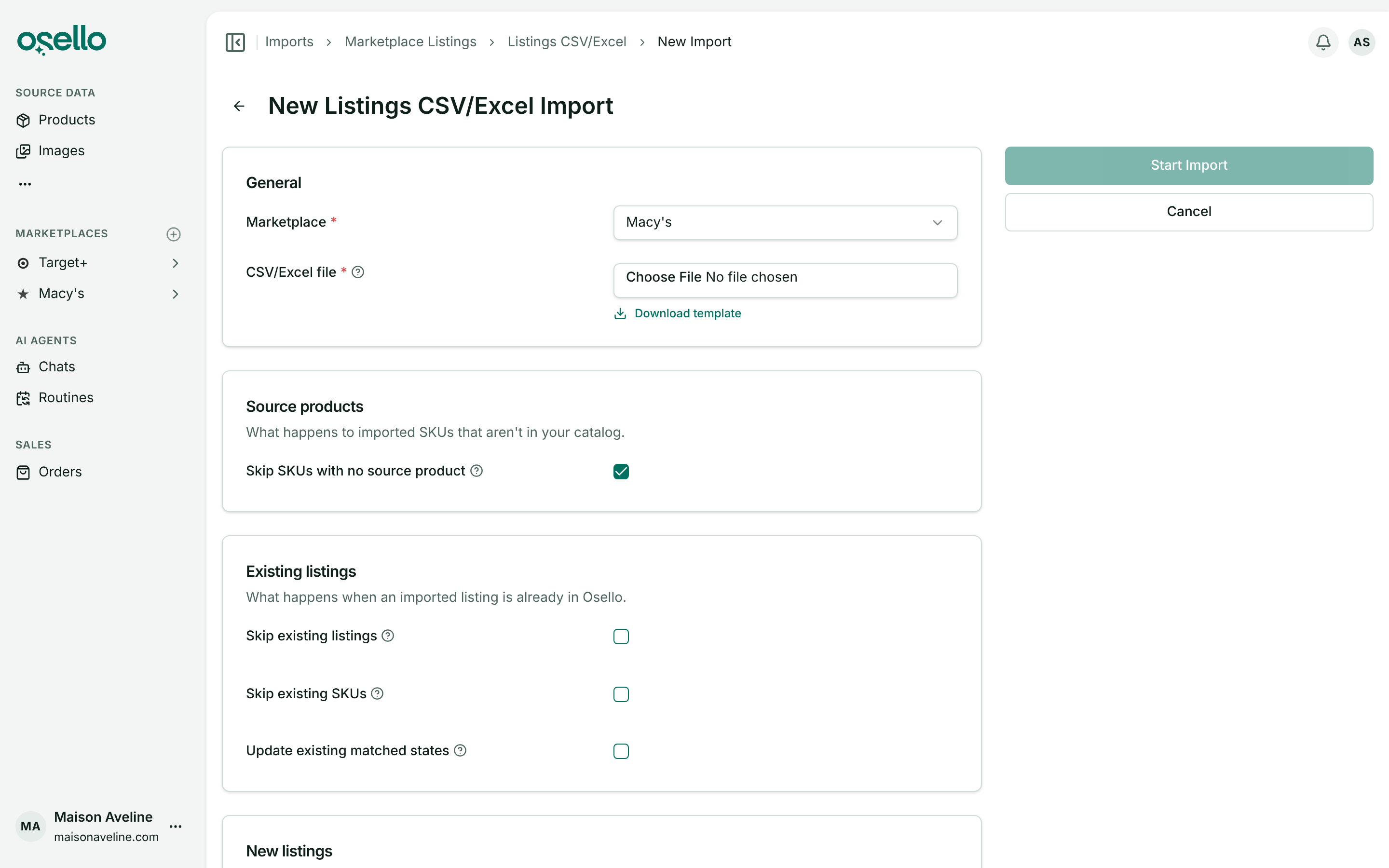
- Skip SKUs that aren't in your catalog when importing listings — a listing import, whether from a CSV or Excel file or pulled from Target+, has a new Skip SKUs with no source product option under Source products. With it checked, a SKU with no matching product variant in your catalog is neither created nor updated, a listing none of whose SKUs matches is skipped whole, and each skipped SKU is named in a warning on its row. Leave it unchecked and those SKUs import unlinked, with a warning, as before. Learn more
Other Notable Changes
- Refunds of shipped items made in Shopify stay in Shopify — the marketplace took the customer's payment, so only the marketplace can pay it back. When you refund or return an item that already shipped on a marketplace order in Shopify, Osello now puts a Refunded in Shopify but not on marketplace error on the order, naming the items, and the order counts as out of sync on your dashboard and Orders list. Contact the marketplace to cancel, refund or return the item, then choose Mark as resolved. Osello resolves it for you once the marketplace shows those items refunded or returned. Each refunded item on the order page also says who started the refund: the marketplace, or Shopify. Refunding an item that hasn't shipped still cancels it on the marketplace. Learn more
API and MCP Updates
Version: 43.0.0
New endpoints
POST /api/stores/{store_id}/channels/{channel_id}/listings/{id}/set_field_values— set one taxonomy field to a fixed value on a single listing and its variants, withunfilled_onlyto leave values that are already there alone. The bulk version of this and of the reset endpoints below runs as a tracked mass action with one row per listing.POST /api/stores/{store_id}/channels/{channel_id}/listings/{id}/reset_fieldsandPOST .../listings/{listing_id}/variants/{id}/reset_fields— clear one or more taxonomy field values on a listing and all its variants, or on one variant. Neither can be undone.
Updated/removed endpoints
- Breaking:
short_descriptionis removed from stores. Usewhat_they_sell, which Osello's agents already read. A store that only had a short description had it copied intowhat_they_sell. - Breaking:
listing_size_aliasesandlisting_color_aliasesare removed from stores. Nothing read them; the listing agents decide which product options are sizes and colors. - Order line items carry
refunded_by:channelwhen the marketplace refunded the item,integrationwhen it was refunded in Shopify first, ornull.
Notes for API consumers
- MCP — new tools
set_channel_listing_field_values,reset_channel_listing_fields,reset_channel_listing_variant_fields,auto_crop_channel_listing,copy_channel_listing_to_channel,disable_channel_variantandget_sync_issue_summary. The existing bulk tools keep their names and now launch a mass action whose rows you can follow withlist_mass_action_rows.